Light
Light & Tone
Brightness and gamma, each with its own reset. Pull detail out of shadows while the bright parts stay clean.
Never touches the game or anti-cheat
Saturation, vibrance, gamma and warmth on top of the game. Four profiles built in, yours saved beside them, switched in one click.
Join the players on Discord→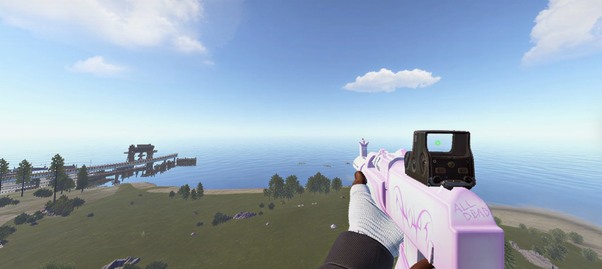 Live · Custom
 Colorware
Filters
Active
LIFETIME
▢—✕
Colorware
Filters
Active
LIFETIME
▢—✕
Hover the menu to try it. Pick a profile or drag a slider and the frame updates.
Safe by design
Colorware changes the colours on your screen, the same way your monitor or graphics driver settings do. It doesn't run inside the game, so there is nothing for Easy Anti-Cheat to see.
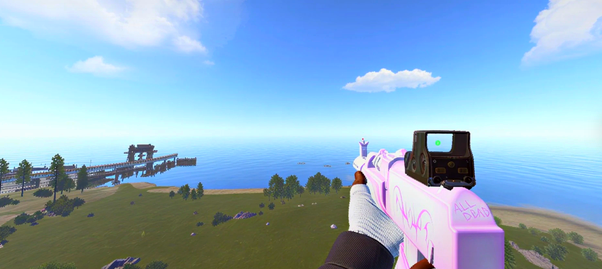
Saturation · Vibrance · Warmth
Get a cleaner, more vibrant Rust picture in seconds. Push saturation and vibrance past what the in-game settings allow, shift the warmth, and the frame on the right is what you play on. Drag the handle to see it.
Profiles
Night Vision lifts the dark parts of the picture so you notice silhouettes and doorways sooner, without pushing gamma until the whole screen turns grey.
Click one to load it into the menu at the top.
How it works
Weekly or lifetime, here or at a verified reseller. The key is on your order page and in your email the moment payment clears.
Paste the key on the download page, hit Verify, download the build. The key binds to the first PC that launches it.
Open Colorware, choose Custom, Cold, Warm or Night Vision, turn on Auto apply, and it loads itself every time after that.
Why not just tweak settings
| In-game settings | Monitor / GPU panel | Colorware | |
|---|---|---|---|
| Saturation and vibrance | No | Global, changes your desktop too | Per profile |
| Gamma and brightness past the game's limits | Capped | Fiddly, affects everything | Yes, with its own reset |
| Warmth shift | No | Some monitors | One slider |
| Night Vision preset | No | No | Built in |
| Switch looks without leaving the game | Menu, every time | Alt-tab and buttons | One click, or auto apply |
| Save and share profiles | No | No | Import and export |
| Changes game files | No | No | No |
Vouches
Real reviews from Colorware buyers in our Discord and our resellers’ Discords, copied word for word.
“colourware made my game look crazy good and it didnt drop my fps”
“colourware is the best color productt i ever had game looks insane best on market”
“best colorware, i can see everything at night”
“colourware game is looking hella clean”
“coloeware i bought it and i get so much likes and questions with colorware”
“coloware is so nice the game looks fantastic”
“colorware is goated nightvision is the best”
“colorware is very helpful getting rid of darker games”
“colorware is the best in the game and will always be”
“colorware is the best in the game looks great”
“love colorware there is so much colors”
“colorware goated on different levels”
“colourware on top lowkey”
“colour ware 10/10”
“color ware 1000/10”
“colorware goated”
“colorware is goated🥰”
“colorware tuff af”
“colorware pretty colors”
“the colorware is so goated ❤️”
“nice colorware is crazy”
“love the scripts and colorware”
“colorware amazing”
“best colorware”
“colorware is crazy”
Bought Colorware? Leave a vouch in the Discord.
Trusted by the community
What's inside
Light, colour and ready-made profiles in one app, with instant switching.
Light
Brightness and gamma, each with its own reset. Pull detail out of shadows while the bright parts stay clean.
Colour
Saturation and vibrance make the picture richer without turning Rust into an overblown filter. Warmth shifts it blue or orange.
Profiles
Custom, Cold, Warm and Night Vision come built in. Create your own from the sliders and switch instantly.
Safety
No file changes and no game modification. Colorware applies to the picture on screen, and turning it off puts everything back.
Access
Every plan includes the full product and all profiles. Keys are delivered the moment payment clears.
Start
$9.99/ 7 days
Three of these cost a lifetime key.
Popular
$29.99onceSame as 3 weeks
Pays for itself in three weeks. Every update after that is free.
 PayPal
 Bitcoin
 Litecoin
 Solana
Don't have a payment method we accept? Pay by card or anything else at a verified reseller. Same product, same price.
Verified resellers
Already have an account at one of these shops? They're authorised to sell Colorware at the same price. Nobody else is. A key from anywhere not on this list isn't ours.
Week and lifetime keys. The loader sits on your account's Loader tab with your key built in.
Open product page → ✓ Verified AscendScripts ascendscripts.comListed as Ascend ColorWare. Same two tiers, same product, same instant delivery.
Open product page →Run a shop? Become a verified reseller →
Questions
Yes. Colorware never injects into Rust, never reads or writes game memory, never touches game files and never interacts with Easy Anti-Cheat. It works on the picture your PC sends to the screen, like your monitor or graphics driver colour settings, so there is nothing in the game for anti-cheat to detect. Turn it off and everything is exactly as it was.
Any game or application on Windows 10 or 11, since it works on what's on screen rather than hooking into one title. It's built and tuned around Rust. macOS, Linux and consoles aren't supported.
No. A key binds to the first PC that launches Colorware with it and stays there. If you're changing PC, ask in the Discord before you move.
The filters stop applying after seven days from the first launch. Export your profiles before then and import them again with a new key, so nothing is lost.
PayPal, Bitcoin, Litecoin and Solana here, through SellAuth's checkout. If you need to pay by card, buy from a verified reseller. Same product, same price.
The Discord. It's also the Open Discord button inside the app. Bring your order email if it's about a key.
No. Keys are digital goods delivered instantly, so all sales are final. If you're unsure, start with a weekly key. The full refund policy is short.
Colorware
Questions about setup or profiles? The Open Discord button inside the app goes straight to support.
Get Access →